At a glance
- Product
- Nightdrive, an app that turns any song file you own into a slowed + reverb, sped up, nightcore, phonk, lo-fi or 8D version, in four guided steps, by describing the sound in Highbeam, or with every control in the Advanced studio.
- My role
- Product lead, covering who the sounds are for, the presets, the one effect chain and Highbeam.
- Timeframe
- Ongoing.
- Status
- A web app I designed and built that turns song files you own into slowed and reverb, sped up, nightcore, 8D and lo-fi versions.
OutcomeOne studio with three ways in, where what you hear while the song plays is what you get in the file, and where the originals are never changed.
- Three ways in, Basic, Advanced and Highbeam, drive one effect chain.
- The preview and the export render the same chain in the same order, then set the loudness.
- Highbeam takes any description of a sound, shows every setting it moved, and undo takes back its last reply exactly.
Reports at the end of the page are the gate every build has to pass and the simulated persona review.
The problem and who has it
Slowed + reverb, nightcore and 8D edits are a lasting way people listen. Most tools for making them are web and phone apps, and changing speed alone is becoming a standard feature, so Nightdrive is built around the part that is harder to get right, which is the combination of speed, pitch, reverb, bass, tone and space that makes a sound.
Effect combinations
The sounds people chase are combinations of speed, pitch, reverb, bass, tone and space working together. Nightdrive builds its presets from how these edits are made and named, not from a single slider.
A real file at the end
Audio comes first. Nightdrive makes audio files, not videos, with loudness matched for streaming and every export format a producer expects.
Private by default
Your songs stay yours, and originals are never changed. A shared sound is a link with the settings only, never the music.
The context and the evidence
Changing a song’s speed and pitch has become an ordinary way to listen and post, and the tools for it have not kept up. Most tools for making them are web and phone apps, and changing speed alone is becoming a standard feature. The sounds people chase are not one setting. They are speed, pitch, reverb, bass, tone and space working together, and getting them right by hand takes audio skills most listeners do not have.
Two things followed from that. First, Nightdrive builds its presets from how these edits are made and named, not from a single slider. Second, it makes a real audio file at the end, with loudness matched for streaming, since a preview that cannot be exported is not a finished edit.
Who it is for
Changing a song’s speed and pitch is now an ordinary way to listen and post. Nightdrive is for the people who make those versions themselves and want a finished file at the end.
Listeners with no audio experience
You like slowed and sped-up songs and have never opened audio software. Basic is designed as four guided steps, from adding a song and picking a sound to adjusting the sliders and exporting an MP3.
People who have recorded or mixed
You want every effect with exact values, in and out points, presets you can save, batch export, and loudness and true-peak control. That is the Advanced studio, and every value can be typed.
Edit makers
You need several versions of one song fast. One export gives you four, slowed + reverb, super slowed, sped up and nightcore, each keeping your trims and fades.
Independent artists and small labels
You own the masters and want official slowed and sped-up versions of your own releases. The alternative today is doing each one by hand in a recording program.
Sleep and study listeners
You want a long, calm version. Nightdrive can extend a song to a long, calm length and fold the reverb tail onto the start so the seam is clean.
Anyone who would rather say it
You know what you want it to sound like and not which sliders make it. Highbeam takes a sentence and builds the effect chain.
Goals and how success is measured
Nightdrive has three goals, and each one answers the problem above.
Get the whole combination right, with speed as one part of it. The sounds people chase are speed, pitch, reverb, bass, tone and space working together, so the presets are built from how these edits are made and named.
End with a real file. A preview that cannot be exported is not a finished edit, so every sound ends as an audio file with loudness matched for streaming.
Meet people where they are. A guided path for people who have never opened audio software, every control for people who have, and plain words for anyone who would rather say it.
| What is measured | How it is checked | Where it stands |
|---|---|---|
| Whether the software works end to end | An automated run drives the installed build with no window and no sound, covering every screen, the checks written for each change, and whether data survives quitting and reopening | Part of the gate every build has to pass. It tests the software, not how pleasant the results sound. |
| Whether Highbeam understands what people describe | Tests of request understanding, safety, limits on every value, exact undo and hostile links | Part of the same gate |
| Whether a very large library stays usable | A test fills My music with a very large library, scrolls, jumps to the end and searches against frame time and search time limits | Run on the development build |
| Whether a first-time listener finds Basic easy | A study with real listeners | Not yet done. A simulated persona review stands in for it and is not usability testing. |
My role and the decisions I made
I owned the product, including who the sounds are for, how the presets are chosen, the one effect chain and how Highbeam responds to a description. The decisions below are the ones that shaped it.
What I owned
- The idea that the product is built around the combination, not the speed slider.
- The three ways in and the rule that they all drive the same effect chain.
- The twelve sounds in Basic, each with a reason, and the rest in Advanced.
- Highbeam as an open way to ask for any sound, with safety limits on every value.
- What the product says about what has and has not been tested.
Decisions
Presets from the trends, not one slider
Speed alone is becoming a standard feature, so the product is built around the combinations people actually chase, researched against how the edits are made, named and searched for.
Three ways in, one studio
Basic for people who have never touched audio software, Advanced for people who have recorded or mixed before, and Highbeam for anyone who would rather say it in words. They all drive the same effect chain.
What you hear is what you export
The preview and the export render the same chain in the same order, then set the loudness. There is no gap between the preview and the file.
Audio first
Nightdrive makes audio files, not videos, offering an MP3 in Basic, and MP3, WAV, AIFF, FLAC or M4A in Advanced, with loudness matched to a target you choose. Every export is a new file.
Originals are never changed, and songs stay private
A shared sound is a link with the settings only, never the music.
A saved sound gives the same result next time
Reverb and noise are generated from fixed seeds, so a sound you saved sounds the same the next time you use it.
Two apps, one gate
A development build with its own test data and the main app are separate apps. Nothing moves from one to the other without passing the automated gate and an explicit approval, and a backup is taken before every update.
How it was made
Nightdrive was made in the order below. Each step names what it produced, and only steps the product’s own notes support are listed.
- 1DiscoverA review of consumer tools and of how people make, name and search for slowed, sped-up, nightcore and 8D edits.
- 2RequirementsA real audio file at the end, with loudness matched for streaming, and originals never changed.
- 3PrioritizePresets from the trends, twelve sounds in Basic each with a reason, and the rest in the Advanced studio.
- 4DesignThree ways in that drive one effect chain, and a Highbeam that takes any description.
- 5BuildA development build with its own test data and the main app as separate apps.
- 6CheckAn automated gate on the installed app, a check that only the visible screen is clickable, and a verification after every update.
- 7Next stageA study with real listeners, which has not been done.
The solution, step by step
1. Basic, four guided steps
Basic for people who have never touched audio software, Advanced for people who have recorded or mixed before, and Highbeam for anyone who would rather say it in words.
Basic is built for people who have never touched audio software. A song goes in, a sound is picked from the tiles, and the original file is never changed.
The presets came out of a review of consumer tools and of how people make, name and search for these edits. The most popular are the tiles in Basic, and the full set is in the Advanced studio.
Notice. Basic is four steps, from adding a song and picking a sound from the tiles to adjusting the sliders and exporting.
| Sound | What you hear | Why it is in Basic |
|---|---|---|
| Slowed + Reverb | Slower and deeper, with a dreamy hall echo | In every consumer tool reviewed. The style has been around for years and surged recently. |
| Sped Up | Faster and brighter | Labels now release official sped-up versions of their own songs. |
| Nightcore | High, fast and hyper | In most of the tools reviewed. |
| 8D Audio | The song circles your head; use headphones | Common on video sites for years and still widely made. |
| Bass Boosted | Bass that hits hard | A preset or a headline control in many of the tools reviewed. |
| Super Slowed | Extra slow, heavy and huge | A standard label on phonk uploads. |
| Lo-fi | Warm, dusty and calm | Among the most common genres in study and sleep playlists. |
| Phonk | Dark and gritty, made for edits | Splice and MIDiA report that phonk reached the mainstream. |
| Another Room | Muffled, like music through a wall | The song-playing-from-another-room edit, a long-running format. |
| Underwater | Deep and blurry | A standard variant of slowed edits. |
| Concert | Like hearing it at a stadium concert | Apps that add stadium and arena sound have an audience of their own. |
| Sleep | Soft, slow and calm for bedtime | A study of sleep playlists found sleep music is quieter and slower, and much of it is familiar pop. |
The rest are in Advanced, among them Slowed + Bass, a sped-up version that keeps the vocal in its original key, Late Night, Chopped & Screwed, Daycore, Vaporwave and an alternate-tuning retune. Trend notes are from third-party sources cited in the preset research. Any preset is a starting point. Change a value and save the result as your own.
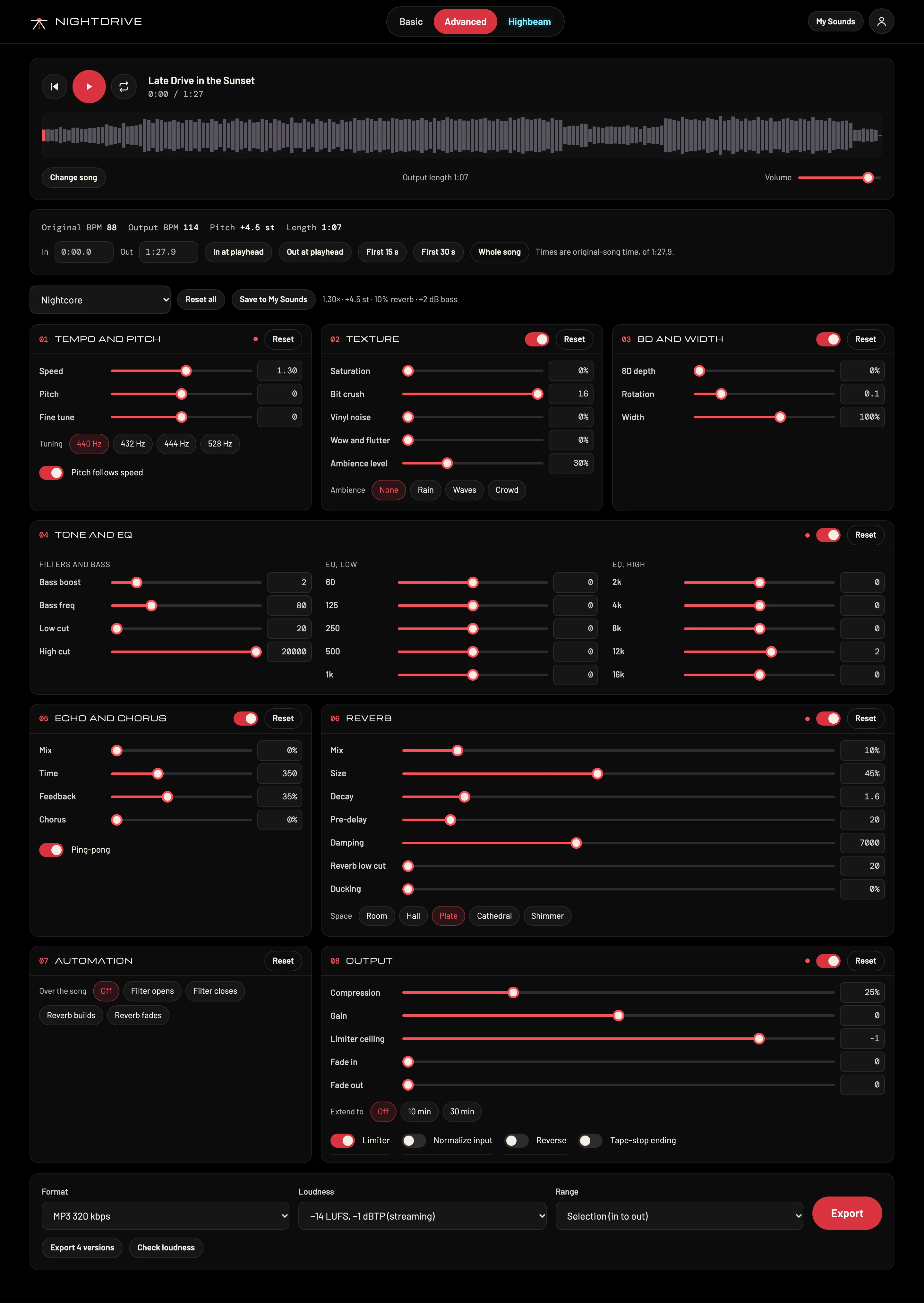
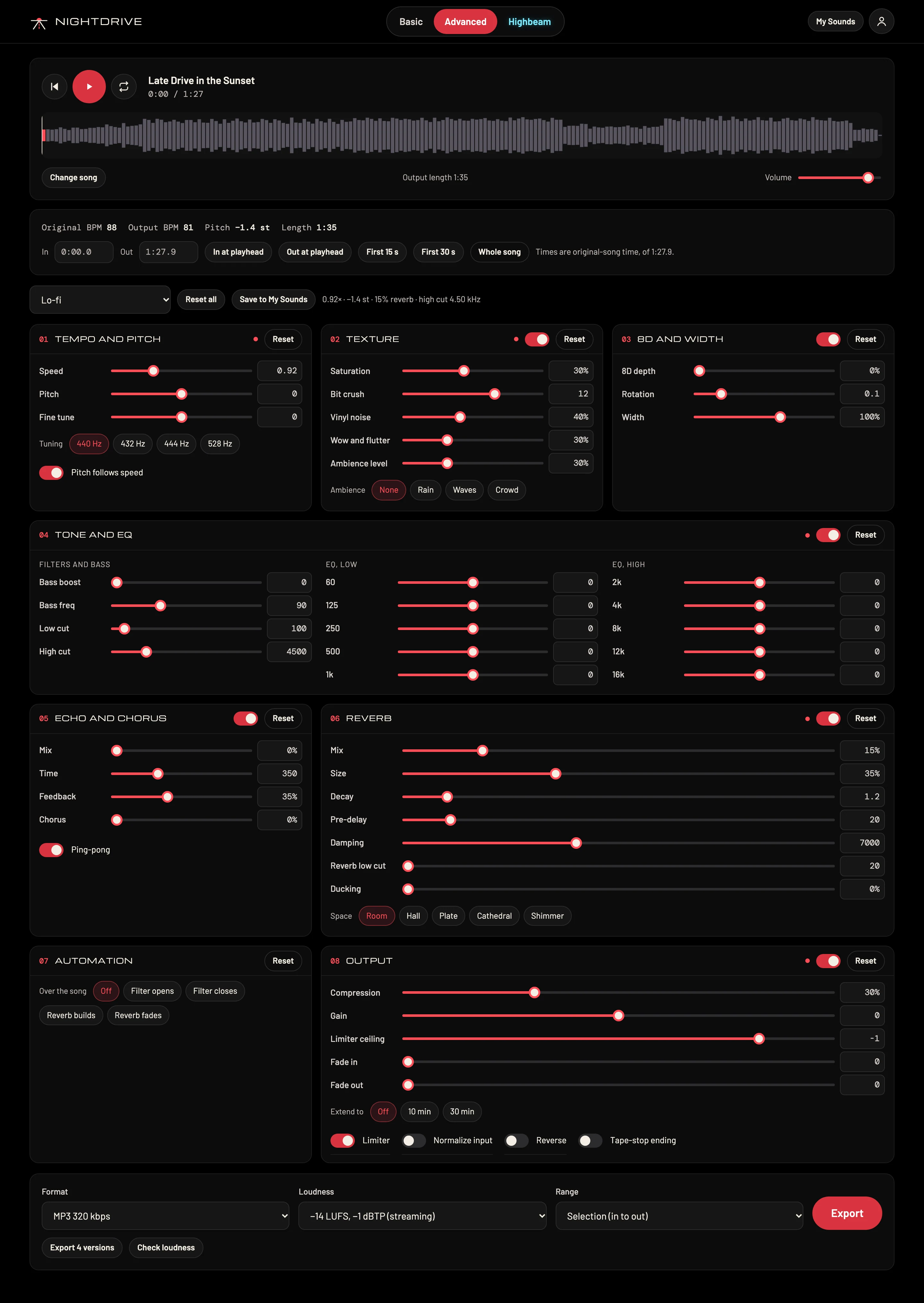
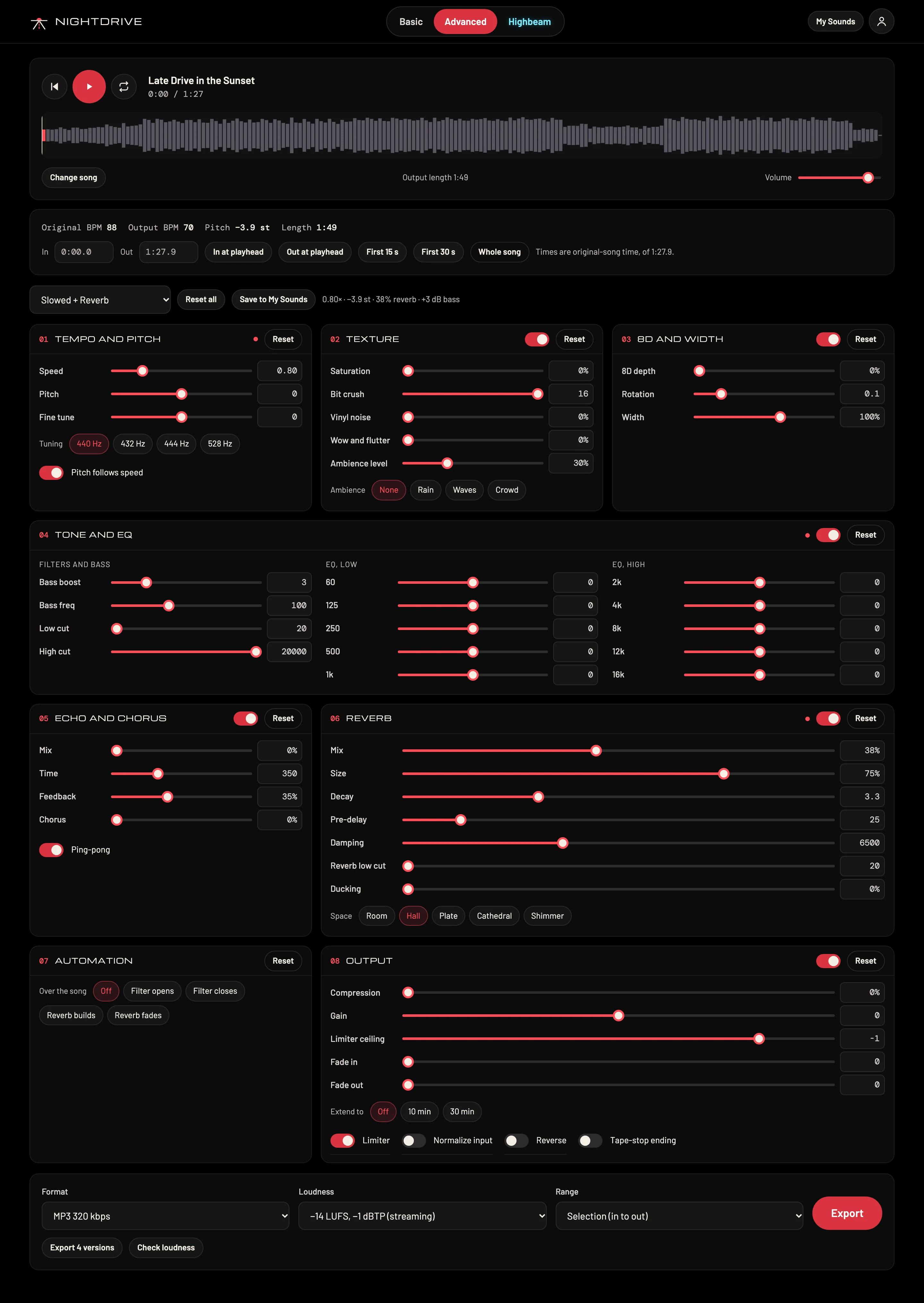
Notice. The effects rack runs in signal order, and presets switch while the song plays.
2. Advanced, every control
Advanced is the same studio with every control exposed, for people who have recorded or mixed before. One song can become four versions in one export, with trims and fades kept.
The parts a speed slider doesn't give you
- Use only part of the song. Drag two handles on the waveform, or tap a preset length. Start and end times show as you move them, and Play this part lets you hear the cut before you save it.
- Four versions in one export. Slowed + reverb, super slowed, sped up and nightcore from one song, keeping your trims, fades and length.
- Several songs at once. Queue songs in Advanced, apply one preset to all of them and export the set. Songs with the same name are kept apart.
- My music. Songs and every version you make of them in one place, with search, favorites, and a main version for each song. A song that is already there is skipped when you add it again.
- My Sounds. Save a sound from Highbeam with its whole chat. Rename it, edit it, use it on another song, or set it as the sound every new song starts with.
3. Highbeam, describe the sound
Highbeam is the third way in, for anyone who would rather say it in words. A sentence becomes settings you can see, and the sound can be kept with its whole chat.
Any sound you can imagine. Describe it.
Describe the sound in your head, in your own words: a cassette in a car, underwater in a pool, a cathedral at night. Highbeam turns what you say into the effects that get there, plays it on your own song, and shows every setting it moved. Keep talking to refine it, then save it with the whole chat.
- Refine in plain words while it plays. Describe what you want in your own words and keep talking to refine it. Highbeam shows every setting it moved, and undo takes back the last reply exactly.
- Saved sounds with their chat history. Save the result to My Sounds with the whole chat, and use it on the next song.
- Share a sound as a link. Settings only, no music.
- Audio first. Basic exports an MP3. Advanced exports MP3, WAV, AIFF, FLAC or M4A, one song or several, with the loudness matched to the target you choose. Every export is a new file.
Notice. Keep talking while the song plays, and each reply moves settings that you can see.
4. One effect chain, in the preview and in the export
You bring a song and say what it should sound like, with a tap on a sound or a sentence to Highbeam. Highbeam turns the words into an effect chain of tempo and pitch, tone, reverb, 8D and a limiter. You hear every change while the song plays.
The result goes where you want it, exported in five formats, saved to My music as a new version, or kept in My Sounds with the whole Highbeam chat. Your original file is never changed.
What you hear while the song plays is what you get in the file. The export renders the same chain, in the same order, then sets the loudness.
| Module | What it controls |
|---|---|
| Tempo and pitch | Speed, with pitch following speed or moving on its own, so a faster song can keep its key, and tuning. |
| Tone and EQ | High and low cut, bass, and an equalizer for the bands in between. |
| Texture | Saturation, bit crush, tape wobble and vinyl noise. |
| Echo and chorus | Echo that can lock to the beat, and chorus. |
| Reverb | Room, Hall, Plate, Cathedral or Shimmer, with a low cut that applies to the reverb only. |
| 8D and width | Stereo width and the 8D pan that moves the song around your head. |
| Output | Compression, gain, fades and a limiter with a ceiling you set. |
Loudness comes at the end. After the chain, Nightdrive measures the loudness of the whole result, sets the gain to the target and holds the peaks under a limit. The default target is the same in Basic and Advanced alike. In Advanced, Check loudness reports the level and peak before and after.
| Format | What you get |
|---|---|
| MP3 | Quality of your choice, with title and artist written into the file |
| WAV and AIFF | Bit depth of your choice, with dither where it is needed. WAV also in floating point |
| FLAC | Lossless, at the bit depth of your choice |
| M4A | AAC |
| Loudness targets | A choice of streaming-friendly targets, or off |
The screens and scenes on this page show sample settings, not results.
5. Where the AI is, and the rule it works under
Most of Nightdrive is ordinary audio software. The AI does one job, in Highbeam, which is to turn a description of any sound into effects you can see and hear.
| Job | What the model does | The rule it works under |
|---|---|---|
| Highbeam | Turns a sentence into an effect chain of tempo and pitch, tone, reverb, 8D and a limiter | It takes any description of a sound and turns it into settings you can see. It plays the result on your own song and shows every setting it moved, and undo takes back the last reply exactly. |
| Fine-tune | None, since the settings Highbeam chose open in the Advanced studio | Every value can be changed by hand, and the changes carry back into the Highbeam session. |
Results, what I learned and what is next
This section says what exists on the current development build and what the tests are for. It reports no numbers. Everything not yet tested is said to be so.
| What | What it does | Where it stops |
|---|---|---|
| The app | Three modes (Basic, Advanced, Highbeam), a researched set of presets and a named list of export formats | A web app I designed and built. |
| End-to-end checks | An automated run drives the installed build with no window and no sound, covering every screen, the checks written for each change, and whether data survives quitting and reopening | They test the software, not how pleasant the results sound. |
| Highbeam tests | Request understanding, safety, limits on every value, exact undo, a round trip through a shared sound link and hostile links | They test that Highbeam responds safely to any description. |
| A large library | A test fills My music with a very large library, scrolls, jumps to the end and searches | Run on the development build against frame time and search time limits. |
| Simulated persona review | Simulated personas, some new to audio and some experienced, reviewed real screenshots of the build, and their findings were fixed | The personas are simulated, not real users. This is not usability testing, as the fixes show where screens were unclear, not how real people behave. |
Not yet done is a study with real listeners. The persona review was simulated, so how easy Basic is for someone who has never opened audio software has not yet been tested with real people.
What I learned
- A screen’s text being present does not mean a person can use it, so the gate checks what is clickable after every screen change.
- A preview that cannot be exported is not a finished edit, which is why the preview and the export share one chain.
- Saying what a test is for, and what it is not, is part of reporting the test. A simulated review shows where screens were unclear, not how real people behave.
What I would do next
- Run a study with real listeners, starting with how easy Basic is for someone who has never opened audio software.
- Test the main app against the same gate as the development build before anything moves between them.
- Keep widening what Highbeam understands as people describe new sounds.
Reports
Each report below says what it covers and what it does not.
- The gate every build has to pass. The automated checks and what they are for.
- The simulated persona review. What the review found and changed, and what it is not.
The gate every build has to pass
This note describes the gate. It builds the site, checks the copy rules, runs the Highbeam unit tests and then drives every flow headless at desktop and phone widths, including an export whose audio is compared sample by sample with what the preview played. On the app side the three steps are below. Nothing moves from the development build to the main app without passing the gate and an explicit approval, and a backup is taken before every update.
- 1Test the installed appAn automated end-to-end run drives the installed development build with no window and no sound, covering every screen, the checks written for that change, and whether data survives quitting and reopening.
- 2Check what is clickableA screen's text being present does not mean a person can use it. After every screen change the tests check that only that screen is showing and that its controls are the ones under the pointer.
- 3Verify the updateAfter an update, a read-only verification runs on the updated app, including real playback. A backup is taken before every update so it can be rolled back.
It covers whether the software works and whether Highbeam responds safely to what people describe. It does not say how the results sound or how real people find them.
The simulated persona review
Simulated personas, some new to audio and some experienced, reviewed real screenshots of the build, and their findings were fixed. The findings were practical. Saving looked the same before and after, and choosing part of a song showed no times. Each was fixed on the screen it came from.
- Saving looked the same before and after. There is now a clear saved message.
- Choosing part of a song showed no times. It now shows start and end, and plays the part.
- A preset name read as an artist’s name. It is now Another Room.
- Loudness defaults differed between Basic and Advanced. Both now use the same default.
- The tempo was approximate and fixed. It can now be edited, halved or doubled.
The personas are simulated, not real users. The review shows where screens were unclear, not how real people behave, and it does not replace a study with real listeners.