At a glance
- Product
- Workday’s accessibility AI strategy, a 12-month internship project on where AI could make Workday work better for people with disabilities, and whether to build or partner.
- My role
- Senior Technical Product Manager, AI/ML (Internship): I led the research into the solutions and wrote the rollout plan, the roadmap and the AI development practices.
- Timeframe
- 2024 to 2025, 12 months.
- Status
- A research and recommendation project delivered to Workday’s design, engineering and executive leaders and to customers.
OutcomeA recommendation to partner first, with 8 partnerships worth pursuing and 3 to roll out first, for a product with 70M+ end users.
- 50+ AI vendors researched and scored on the same five criteria.
- A market map, a trade study and a partnership evaluation matrix.
- A rollout plan, a roadmap and AI development practices for the accessibility AI team.
Notes at the end of the page, under Reports.
The problem and who has it
In short. Workday asked where it should use AI first to improve accessibility, and whether to build or partner. We mapped the market, scored the vendors against Workday’s own goals and recommended partnering first, starting with the options that could each be piloted without a large integration project. I then wrote the rollout plan for each, a roadmap and the practices the accessibility AI team should follow when building with AI.
Workday is the system a large company uses to pay people, track time off, hire and report on its workforce, which means people with disabilities use it every week. The accessibility team had a practical question. AI was making new kinds of help possible, like describing a chart to someone who can’t see it or captioning a meeting live, but the market was crowded and changing monthly. Where should Workday use AI first, and should it build those features or partner with someone who already had?
Starting from people
The first thing we did was resist the urge to list vendors. We split accessibility into four groups of users and wrote down, for each, the job they need done and what has to be true for software to do it. It stopped us chasing whichever model was newest and gave Workday a way to compare options that wasn’t about features.
Understand charts, dashboards and documents without sight
A person who is blind or has low vision
Control devices and complete tasks independently with limited mobility
A person with a motor impairment
Follow meetings and calls with accurate real-time transcription in many languages
A hard-of-hearing employee
Process dense information; find work that fits cognitive strengths
A person with dyslexia, ADHD or autism
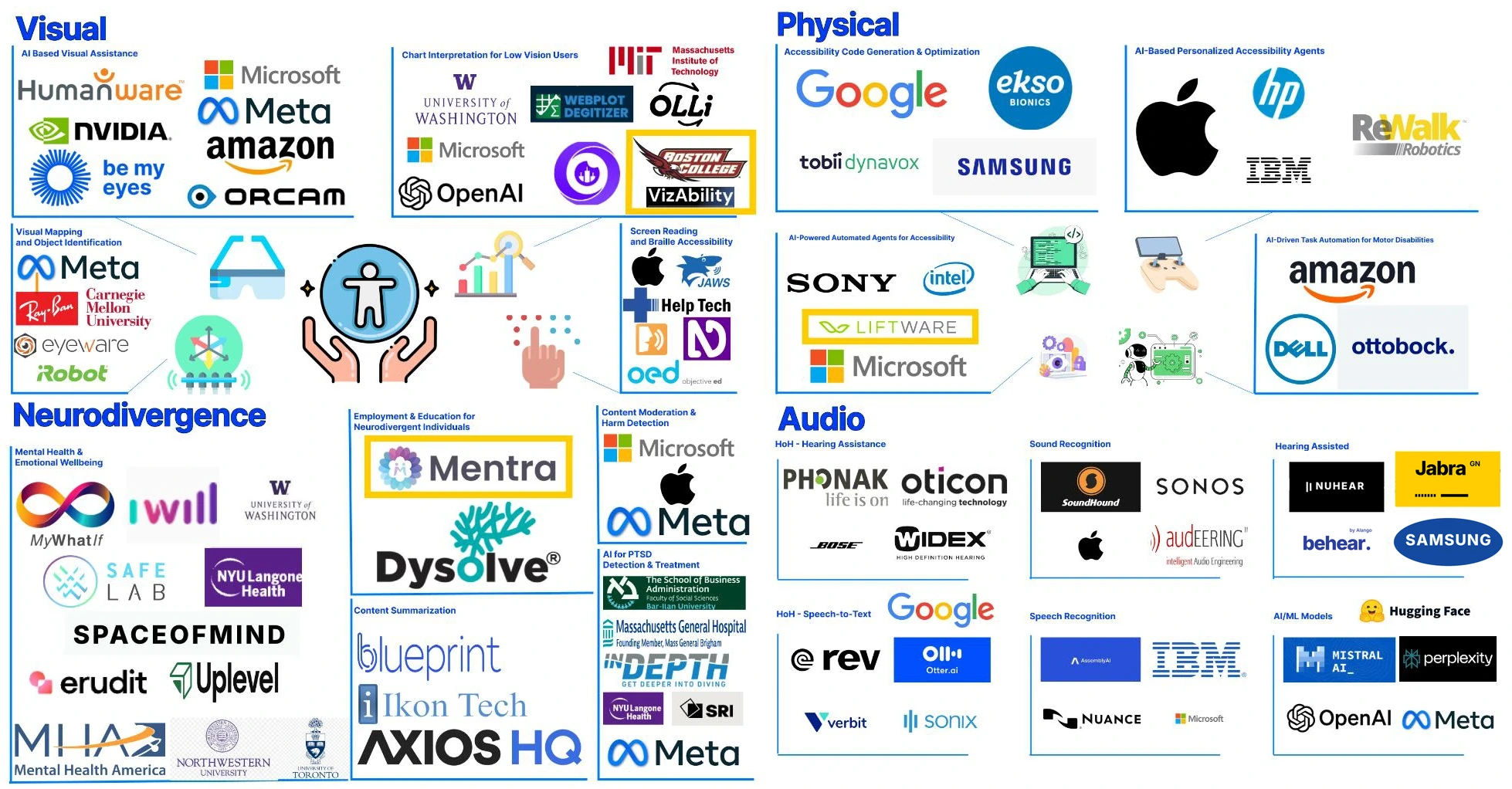
These are the options that reached the detailed trade study; the full map covered 50+.
When I interact with visual charts, I want access to accurate, detailed descriptions and alternative ways to understand the data, so that I can make informed decisions without needing to rely on visual modalities.
Problem statement, visual group
Scoring more than 50 vendors
The market map was the first big deliverable. We found companies, products and research groups in each of the four groups, from large technology firms to university labs and small startups, and sorted them by the kind of help they offered. Then we had to compare them fairly, which was harder.
Every shortlist was rated on the same five criteria.
| Criterion | Why it matters | What we looked for |
|---|---|---|
| Feature success rate | Accessibility users rely on the output, and a wrong answer harms them | Published accuracy, benchmarks, hands-on testing |
| Daily and monthly active users | Evidence that real people adopt it | Usage, retention signals, customer references |
| Integration compatibility and time | Engineering cost and fit with Workday’s platform | APIs, data flows, security review effort, estimated weeks |
| Feature latency | Real-time jobs like captions break when they lag | Response time under realistic load |
| Prototyping potential | Can we test it with users in weeks, not quarters? | Sandbox access, licensing, partner willingness |
We showed the result as a table of partial-fill circles, one row per product and one column per criterion, so a busy executive could read a shortlist at a glance. Where scores were close, the difference was in the details, so we ran deep-dives on the leaders.
What we found in each group
Visual. We chose chart interpretation as the focus because charts are common in business reporting, and they are one of the places screen readers struggle most. Any solution has to do three things, which are to convert a chart in any format into data points, answer the user’s questions and draw insights from the data, and communicate the answers in a non-visual way.
Two approaches stood out. VizAbility, a research tool from Boston College, is fully integrated and had a high success rate with accuracy fairly even across chart types, and it follows standard accessibility principles. The downsides were that its white paper doesn’t say which language model it uses, it only works with JavaScript chart libraries, and it has trouble classifying contextual questions. The other approach was to pair the open-source WebPlotDigitizer with a language model. That works on every chart type and format, is completely open source, and its LLM integrations were in development, but there was little performance data, many chart types needed manual setup, and the current version needed us to integrate a language model ourselves. Build versus buy was a real trade-off here.
Physical. The job here is to let people control devices and finish tasks without help. We looked at hands-free control (Microsoft Eye Control, which uses eye tracking and has large-scale adoption) and at task automation for people with motor impairments (Liftware, which personalises help with daily routines). We paired them because one changes how a person interacts and the other reduces how much they have to do.
Neurodivergent. We assessed two products with very different risk profiles. Axios HQ uses AI to turn dense information into a short, digestible format, which could help people with dyslexia, but private internal memos might surface across the platform. Mentra matches neurodivergent people with jobs in tech that suit their strengths, but many people are not comfortable telling their employer about a neurodivergence.
Hearing. Hard-of-hearing users need accurate real-time transcription in many languages. Manual and semi-automated services exist, but they’re limited in accuracy, reliability and supported languages. Our standout was an open-source agentic framework from Hugging Face, which benchmarked at 90%+ lower cost than enterprise models on tasks like transcription. We also assessed AssemblyAI’s audio-intelligence APIs, which are strong on detecting key attributes of transcribed content. That cost gap changes the build-or-buy answer for this group, which is why it sits further down the roadmap while we verified accuracy and latency.
Compared with the other ways to approach accessibility
Product teams already have ways to chase accessibility, so the comparison is with those.
| The usual way | What it does well | Where it falls short for an enterprise product | What this strategy did differently |
|---|---|---|---|
| Automated accessibility checkers | Fast, repeatable, easy to add to a build | Find only part of the problems and say nothing about how the product feels to use | Looked at where AI could make the product work better for people with disabilities, not only detect problems |
| Overlay tools that patch a page | Quick to install | Do not fix the product underneath and are widely criticised by the people who use assistive technology | Evaluated 50+ vendors and solutions for how well they work for each user group |
| Manual audits and user testing | The most reliable way to find real problems | Slow, periodic and expensive to repeat for a large product | Wrote AI development practices so the same standards apply to new AI features |
| Building every feature in house | Full control | Slow, and hard to keep up with how fast assistive AI is moving | Researched outside vendors, surfaced 8 partnerships and recommended 3 to roll out first |
This compares kinds of tools, not named products, and quotes no figures. Only what is true of the whole kind is claimed. Sourced figures for named alternatives will be added when each can be checked at its source.
Goals and how success is measured
We agreed five goals with Workday at the start, namely to understand the accessibility technology market, line it up against Workday’s strategic objectives, build a market map in Figma in the style of a CB Insights map, run a trade study of AI accessibility options, and identify strategic opportunities for Workday.
How success was judged
Coverage
50+ AI vendors researched across four user groups.
A shortlist
8 partnerships worth pursuing.
A decision
3 recommended to roll out first, with a rollout plan and a roadmap.
My role and the decisions I made
Our team of four interns worked on that question with Workday for 12 months. I led the research into the solutions. Once we had a recommendation I wrote the rollout plan for each option, a roadmap for when to do what, and a set of practices for how Workday’s accessibility AI team should build with AI.
I kept regular check-ins going with Workday’s design, engineering and leadership contacts and presented to leaders and customers along the way, so the final recommendations didn’t land as a surprise.
Partner first
Where to use AI first, and whether to build or partner. We recommended partnering first, starting with the options that could each be piloted without a large integration project.
Start from people, not technology
We resisted the urge to list vendors first. We split users into four groups and wrote the job each group needs done before looking at any product.
Score every option the same way
Rating every shortlist on the same five criteria is what made 50+ vendors comparable. It also made the recommendation easy to challenge, which leadership wanted.
Write the risks next to the benefits
An AI feature that is confidently wrong is worse than none for these users, so each option’s risks sit beside its scores.
How it was made
The 12 months fell into five stages, each feeding the next.
- 1FrameAgree goals, split users into four groups, write the job each group needs done
- 2MapFind every relevant company, product and research group; build the market map
- 3ScoreRate each shortlist on the same five criteria
- 4Deep-diveCompare the leaders in each group, including pros, cons and risks
- 5RecommendChoose partners, then write the rollout plan, roadmap and AI development practices
The solution, step by step
The recommendation
Out of more than 50 vendors we surfaced 8 partnerships worth pursuing and recommended three to start with, which were VizAbility for chart descriptions, Mentra for strengths-based job matching, and Liftware for people with limited mobility. We put these three first because they scored well on the criteria and could each be piloted without a large integration project.
On the question the team started with, build or partner, the recommendation is to partner first. Each of the three can be piloted without a large integration project, and each has a condition to meet before it scales. The one option that would mean Workday doing more of the work itself, open-source transcription, is much cheaper but needs more setup and integration, so it stays a side-by-side test against AssemblyAI until it meets latency and accuracy targets in real meetings.
Rollout plan and roadmap
For each partner I wrote how to start, a success measure and a condition that has to be true before going further.
| Partner | How to start | What has to be true before scaling |
|---|---|---|
| VizAbility | Pilot chart descriptions in reporting with screen-reader users | The vendor discloses its model, and descriptions are accurate on Workday’s own chart types |
| Mentra | Opt-in matching inside recruiting | Candidates control whether and when anything is disclosed |
| Liftware | Research partnership on device and task automation | A co-development scope both sides agree on |
| Open-source transcription | Side-by-side test against AssemblyAI | Meets latency and accuracy targets in real meetings |
How the team should build with AI
The last piece covered how Workday’s own accessibility AI product team should work, so the plan didn’t depend on us being in the room. I wrote it as six practices, in the order a feature moves from idea to release.
- 1Bring users in earlyPeople with disabilities in discovery, not only in testing
- 2Agree the measuresTask success, accuracy, latency and WCAG conformance
- 3Test before releaseAccuracy sets per input type; review of failure cases and bias
- 4Build in the safeguardsModel and data disclosure, privacy review, opt-in, a human fallback
- 5Roll out in stagesFeature flags, pilot groups and clear rollback triggers
- 6Keep watchingUsage data and user feedback; a regression blocks the release
The risks we wrote down next to each option
Responsible AIDoesn’t disclose its model and only supports JavaScript chart libraries. We made disclosure and accuracy on Workday’s chart types conditions of the pilot.
Many people don’t want their employer to know they are neurodivergent. Opt-in only, with the candidate in control.
Its summaries could help readers with dyslexia, but private memos might surface across the platform. Not recommended without data isolation.
Much cheaper, but needs more setup and integration. Test against latency and accuracy targets before committing.
Results and what I learned
What happened
Over the 12 months we presented the work to Workday’s design, engineering and executive leaders and to customers, with the market map, the trade study, a partnership evaluation matrix, a research report and the recommendation. It informed the direction of Workday’s accessibility AI roadmap, and the full deck is linked at the top of this page.
What we handed over
| What we handed over | What it answered | Where to see it above |
|---|---|---|
| Market map | Which companies, products and research groups exist for each of the four user groups, across 50+ options | Scoring more than 50 vendors |
| Trade study | How each shortlisted option compares on the same five criteria, with risks next to benefits | The criteria table and scoring views |
| Partnership evaluation matrix | Which 8 partnerships were worth pursuing, and the 3 to roll out first | The recommendation |
| Rollout plan and roadmap | How to start each partnership and when to do what | Rollout plan and roadmap |
| AI development practices | How Workday’s accessibility AI team should build with AI | How the team should build with AI |
What I learned
- Scoring every option on the same five criteria is what made 50+ vendors comparable. It also made the recommendation easy to challenge, which leadership wanted.
- Listing each option’s risks next to its benefits mattered as much as the scores. An AI feature that’s confidently wrong is worse than none for these users.
- Presenting along the way meant the final recommendation came with support already behind it.
- I would build a rough prototype of the top option during the research next time, to check the integration estimates before recommending it.
Reports
Each note below says what it covers and what it does not.
- The market research. The market map and the trade study behind the recommendation.
- The rollout and practices note. How to start each partnership and how the team should build with AI.
The market research
This note summarizes the research. We mapped the companies, products and research groups for each of the four user groups, across 50+ options, then rated each shortlist on the same five criteria and compared the leaders in each group, with risks beside benefits. It covers the market as it was during the 12 months. It does not claim that any partnership was signed.
The rollout and practices note
This note summarizes the plan. For each of the partnerships worth pursuing I wrote how to start, a success measure and what has to be true, set out as a roadmap of what to do now and later, together with practices for how Workday’s accessibility AI team should build with AI. It covers the plan and the practices. It does not report outcomes after the internship.