At a glance
- Product
- UW Health’s AI clinician workflow assistants, GenAI agents integrated with Epic that draft replies to patient messages, nurse shift summaries and routine documentation for a clinician to review, edit and sign or send.
- My role
- Senior Technical Product Manager, AI/ML, covering the AI/ML roadmap, the agent products, their evaluation, guardrails and governance analytics, leading a cross-functional team of 30+ and an internal development team of 8+.
- Timeframe
- 2023 to 2025.
- Status
- Piloted with 500 clinicians at Wisconsin’s largest health system, then scaled to the whole organization.
OutcomeAn estimated 42,000 clinician hours returned in the first year of the pilot, the capacity of 20+ full-time clinicians, with nothing sent or signed without a clinician.
- 93% clinician-judged task success.
- 2.5% clinician-reviewed hallucination rate, counted per reviewed draft.
- More than 90% engagement, the highest of any piloted UW Health AI tool.
The reports at the end of the page are the evaluation report and the governance note.
The product thesis
My thesis was that the fastest way to return time to clinicians was to take over the first draft of work they already do, inside the tools they already use, and to leave the decision with them. Drafting is where the time goes. Deciding is where clinical judgment and accountability sit. A product that kept the two apart could return time without moving responsibility. Each later choice on this page, from the draft-or-blank screen to the audit trail, follows from that split.
The problem and who has it
I was asked to audit AI across UW Health, Wisconsin’s largest health system. I collected more than 50 use cases, scored them on one five-criteria rubric, took the ranking to senior leadership and executive stakeholders, and came out owning the AI/ML roadmap. The audit showed clinicians spending up to 40% of a shift on messaging, handoffs, documentation and queues, work around care rather than care itself.
The audit started with a list of requests and a question I asked of every one of them. If this works, who gets time back, and if it’s wrong, what breaks? I scored each use case on the same five criteria so that a request from a nursing unit and a request from finance could be compared side by side, and so that anyone who disagreed with the ranking could see exactly why it came out that way.
| Criterion | What it told us |
|---|---|
| Clinician time today | How much of a shift the task takes. Time returned to care was the outcome clinicians would notice first. |
| Risk if it’s wrong | A wrong draft a clinician reads first is a nuisance. A wrong message to a patient or a wrong entry in the chart is a safety event. This set how much human review each use case needed. |
| Fits the workflow | Whether it could live inside Epic and the tools around it. Anything outside the workflow would depend on people opening one more app. |
| Data ready | Whether the data the task needs was available and allowed for that use. |
| Rules that apply | Privacy, clinical decision support and nondiscrimination rules differ by use case and set the work needed before launch. |
Who we built it for
Clinicians answering patient messages
Portal messages arrive all day and most need a short, careful reply. Writing each one from a blank page at the end of a clinic day is where a lot of time went.
Nurses at shift change
They hand over every patient twice a day, pulling the shift’s vitals, medications and notes together by hand. A good summary is safety-critical, and it is also one of the most repetitive jobs on a unit.
Finance and administrative teams
Billing and back-office queues that follow the same steps every time. They needed a simple way to hand those steps to automation without writing code.
A day in the life, before and after
| Who | Before | After |
|---|---|---|
| A clinician answering patient messages | Writes each reply from a blank page, often at the end of a clinic day, and looks up the chart facts by hand | Opens the In Basket, starts from a drafted reply or a blank one, edits it and sends it under their own name |
| A nurse at shift change | Pulls the shift’s vitals, medications and notes together by hand for every handoff | Reviews a summary drafted from the shift’s chart data and accepts it, and nothing is saved until then |
| A clinician with routine documentation | Writes each routine note from scratch | Reviews and edits a drafted note, then signs it |
| Finance and administrative staff | Work the same queue steps by hand every time | Hand the fixed steps to UiPath automation through a simple interface, without writing code |
The first roadmap took the use cases that combined a lot of clinician time with a risk we could control through review, namely replies to patient messages in the In Basket, nurse shift summaries and routine documentation, plus length-of-stay prediction for operations and rules-based automation for finance and administration. Ideas with a high cost of being wrong and no clear place in the workflow waited, however popular they were.
How the use cases were prioritized
| Use case | Clinician time | Risk if it is wrong | What we did |
|---|---|---|---|
| Replies to patient messages | A lot, as part of messaging | A message a patient reads, so every draft is reviewed first | In the first roadmap, as drafts a clinician starts from or replaces |
| Nurse shift summaries | A lot, twice a day per patient | Safety-critical, so the nurse reviews and accepts | In the first roadmap, saved only after acceptance |
| Routine documentation | A lot across the shift | An entry in the chart, so the clinician signs | In the first roadmap, drafted for review and signature |
| Rules-based automation | Repetitive queue work | Low, because fixed rules are easy to audit | In the first roadmap on UiPath, with no language model |
| Popular high-risk ideas | Varied | A high cost of being wrong and no clear place in the workflow | Held back until the review and workflow questions had answers |
Problem statement and hypothesis for each use case
| Use case | Problem | Hypothesis |
|---|---|---|
| Patient message replies | Each reply starts from a blank page and takes careful time | A draft built from the chart gives the clinician a starting point, and review before sending keeps the risk controllable |
| Nurse shift summaries | The handoff is assembled by hand from several chart sources | A draft gathered from the shift’s data removes the collecting and leaves the nurse to check and accept |
| Routine documentation | Routine notes follow familiar patterns but still take clinician time | The same draft-and-sign pattern returns time without a note entering the chart unchecked |
| Finance and administrative queues | Fixed steps are repeated by hand | Rules on UiPath do the steps and are easier to audit than a language model |
Compared with the alternatives
The same work was already being done by hand or with general tools, so the comparison is with those.
| The usual way | What it does well | Where it falls short for this job | What this does differently |
|---|---|---|---|
| Doing it by hand in the record | Every word is the clinician’s | Replies, shift summaries and notes take clinician time that is hard to give | Drafts them from the chart inside the record; the clinician starts from the draft and sends |
| General chat assistants outside the record | Flexible; easy to try | Chart data has to be pasted out; no audit trail; no review gate; no hospital sign-off | Runs in the record with the data it needs only, every draft reviewed by a person before anything is sent |
| Documentation and scribe products | Capture the visit without typing | Focus on visit notes, not patient messages or nurse handoffs; separate sign-on | Covers patient replies, shift summaries and routine documentation under one governance process |
| Waiting for the record vendor’s own features | Supported and integrated | Arrive on the vendor’s schedule and are the same for every hospital | Built and evaluated on the hospital’s own use cases, with its clinicians, on a roadmap it owns |
This compares kinds of tools, not named products, and quotes no figures. Only what is true of the whole kind is claimed. Sourced figures for named alternatives will be added when each can be checked at its source.
Goals and how success is measured
The goal was to return clinician time to care by taking over messaging, handoffs, documentation and queue work, with human review sized to the risk of each use case. Success was judged on the measures below, each defined before launch so that it could be defended afterward.
How success was measured
Time returned
Estimated clinician hours returned in the first year of the 500-clinician pilot, from the tasks the agents took over.
Quality
Task success judged by clinicians, and the clinician-reviewed hallucination rate counted per reviewed draft.
Adoption
Engagement among the 500 pilot clinicians, and how often drafts were sent without edits.
The metrics tree
| Level | Measure | Guardrail |
|---|---|---|
| Outcome | Estimated clinician hours returned in the first year of the pilot | Always called an estimate, counted only on the tasks the agents took over, not a stopwatch study |
| Quality | Task success judged by clinicians, and the hallucination rate per reviewed draft | Escalation, security and fairness checks as gates, and clinicians judging, not the model |
| Adoption | Engagement among the 500 pilot clinicians, and drafts sent without edits | The blank-reply choice, which shows when a draft is not worth using |
| Governance | Edit rates and adoption, reported to the steering committee | Nothing sent or signed without a clinician |
Requirements
- Must. A clinician reviews, edits and sends or signs every draft before anything reaches a patient or the chart.
- Must. Each agent runs under its own identity, reads only the data its task needs and logs every tool call.
- Must. Messages that describe urgent symptoms go to a nurse instead of being drafted.
- Should. Drafts appear inside Epic, in the In Basket and the shift tools, where clinicians already work.
- Should. Every reply offers a draft or a blank start, so clinicians keep their own voice.
- Should. Usage, edits and feedback reach the product team and the steering committee from the same data.
- Not now. Agents sending routine replies on their own, a separate AI app, a language model on fixed-rule work, or broad read access for convenience.
Assumptions and how each was checked
| Assumption | How it was checked |
|---|---|
| Clinicians will use a draft that sits where they already work | Engagement among the 500 pilot clinicians, and the choice between the draft and a blank reply |
| A draft is accurate enough to review quickly | Clinicians judged sampled drafts for task success and for any statement the chart did not support |
| Review before sending keeps errors from reaching a patient | Each flagged draft went into the feedback pipeline, and escalation test cases covered urgent symptoms |
| Quality holds across patient groups | Results were compared across age, sex, race and ethnicity, preferred language and payer |
| The agents can be governed | Every tool call was logged, and adoption, edit and quality measures went to the steering committee |
My role and the decisions I made
I owned the AI/ML roadmap and the agent products built on it, together with their evaluation, guardrails and governance analytics. I led a cross-functional team of 30+, including an internal development team of 8+ that I ran in an agile format, and I co-led the AI steering committee. The decisions below are the ones that shaped the product.
Clinicians send every message
Agents draft replies to patient messages, shift summaries and routine documentation. A clinician reviews, edits and sends or signs each one, and nothing is written to the chart or sent to a patient before that.
Not chosen: Letting agents send routine replies on their own. It would have saved a little more time and turned every error into a message a patient reads.
Start from the draft, or start blank
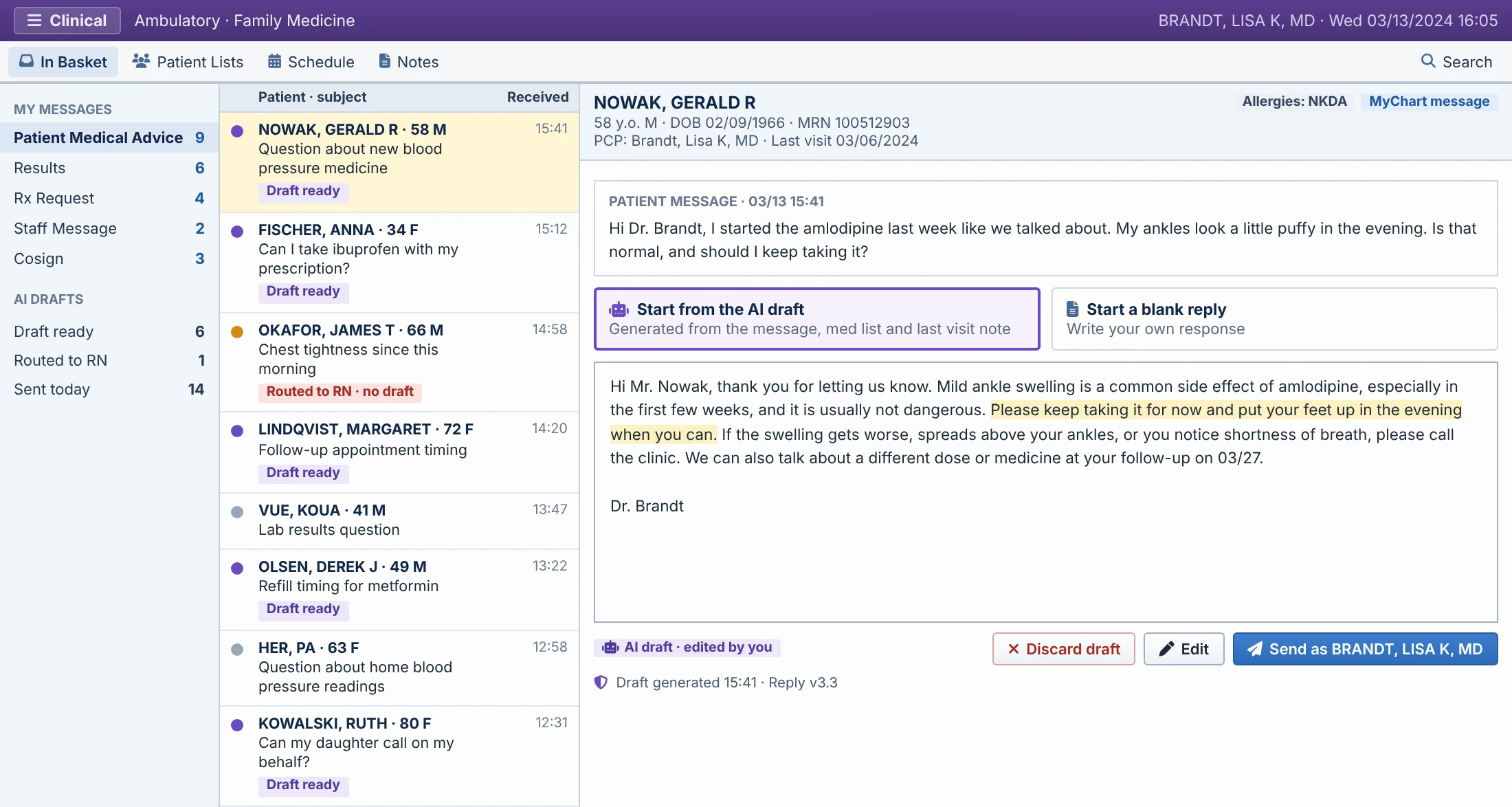
Every In Basket reply offered both, starting from the generated draft or opening a blank reply. Clinicians stayed in control of their own voice, and the choice itself told us when a draft wasn’t worth using.
Not chosen: Pre-filling every reply with the draft, which makes it too easy to send without reading.
Work inside Epic, not next to it
Clinicians already live in Epic, so the drafts appear in the In Basket and the shift tools where they work.
Not chosen: A separate AI app. Faster to build, but adoption would depend on clinicians opening one more tool.
The right tool for each job
GenAI agents on Azure OpenAI GPT-4 for work that needs language. UiPath robotic process automation, with a simple interface for finance and administrative staff, for tasks that follow fixed steps.
Not chosen: A language model on everything. Fixed business rules don’t need one, and rules are easier to audit.
Least privilege and an audit trail
Each agent runs under its own identity, reads only the data its task needs, and logs every tool call, so any action can be traced afterward.
Not chosen: Broad read access for convenience, which would have made the HIPAA review harder and the audit trail meaningless.
Stakeholder map
| Group | What they needed | How they were kept informed |
|---|---|---|
| AI steering committee, senior leadership and executives | A ranked roadmap, honest progress and a say in new use cases | I co-led the committee, presented the use cases, shared progress and reported governance measures from Databricks |
| Legal and compliance | Patient data kept within agreements, minimum access and a traceable record | HIPAA was worked through with them, and each agent’s access was logged |
| Clinicians | Control of their own voice and no extra tool to open | Shown what would come off their plate, what they would review and what would never happen without them |
| Nursing units | Safe handoffs without more manual assembly | Shown that nothing is saved to the handoff until the nurse accepts it |
| Finance and administrative teams | A way to hand fixed steps to automation without code | A simple interface on UiPath, with rules they could follow |
| Development team | Clear scope, with safety built in | Agile sprints, with the guardrails on the same ticket as the feature |
How it was made
The work ran in the order below, from the audit to the organization-wide rollout. Each step names what it produced.
- 1AuditCollect and score 50+ AI use cases across the system on one rubric
- 2RoadmapPresent the ranking to senior leadership and executives, and take ownership of the AI/ML roadmap
- 3BuildBuild the agents with an internal development team of 8+ in agile sprints, with the guardrails on the same ticket as the feature
- 4PilotRoll out to 500 clinicians and judge it on time returned, task success and hallucination rate
- 5GovernReport adoption, quality and compliance measures from Databricks to the AI steering committee
- 6ScaleTake the use cases organization-wide after the pilot year
Agreement across a matrixed organization came less from the ranking itself than from showing each group what it meant for their own work, including which tasks would come off their plate, what they would review, and what would never happen without them. I co-led the AI steering committee, where we presented use cases to senior leadership, shared progress, earned their buy-in and proposed new use cases. And I created an AI education program for UW Health that covered what AI is and how it works, so clinicians, operations and leadership started from the same foundations.
The solution, step by step
From there I led a cross-functional team of 30+, including an internal development team of 8+ that I ran in an agile format, to build AI clinician workflow assistants on Azure OpenAI GPT-4 integrated with Epic, including draft replies to patient messages in the In Basket, nurse shift summaries, and operational agents that predicted patients’ length of stay and generated routine documentation.
Also delivered were Best Buy Health remote patient monitoring, an Epic Willow Ambulatory transition for two new pharmacy locations, and UiPath robotic process automation for finance and administrative teams.
The rule throughout was that nothing reaches a patient’s chart, or a patient, until a clinician sends or signs it.
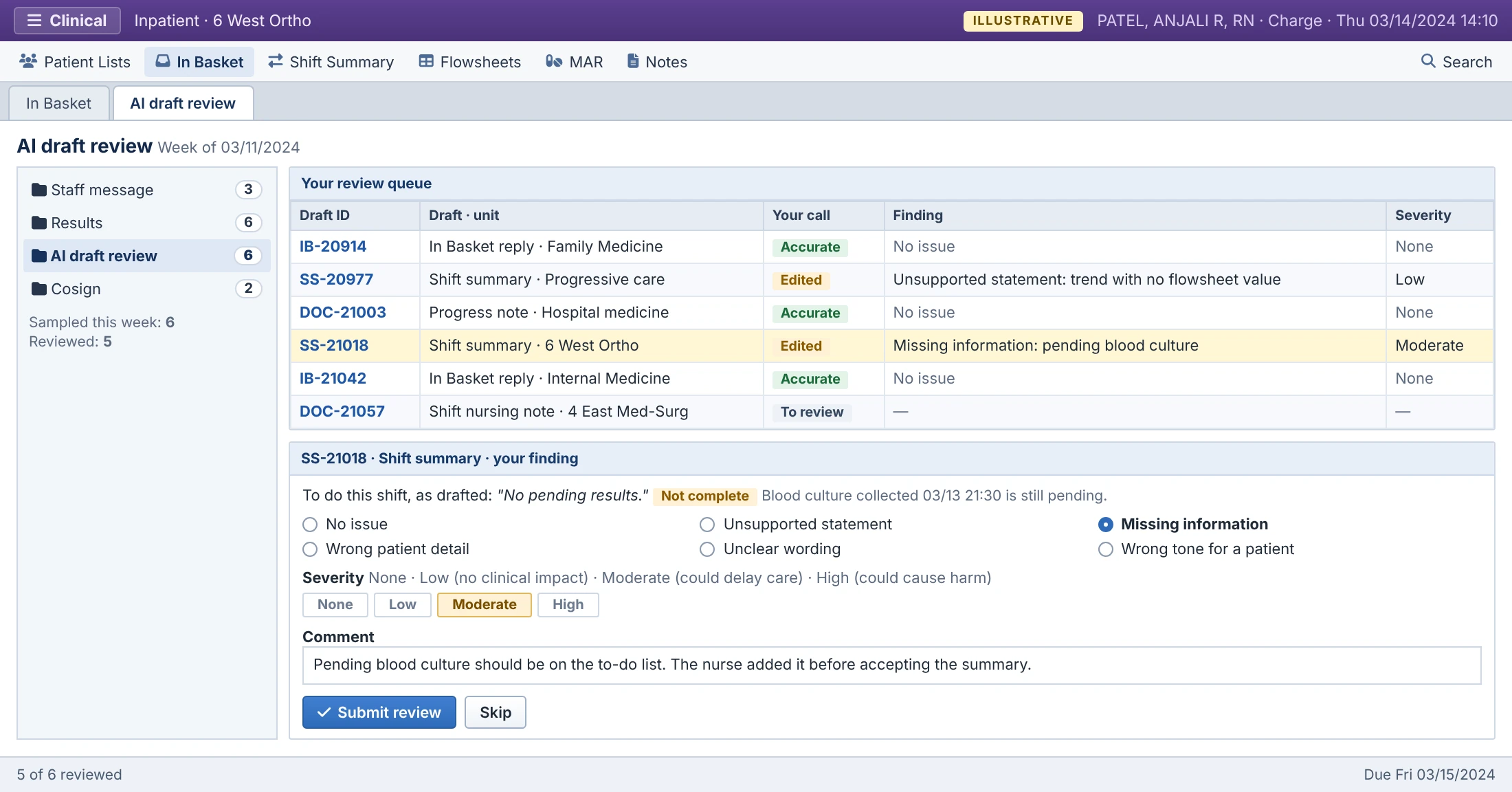
The nurse’s side follows the same shape. At the end of a shift the agent gathers the vitals, medications and notes that a nurse would otherwise pull together by hand, and drafts the summary. The nurse reads it, corrects it and accepts it. Until then nothing is saved to the handoff, so the draft saves the collecting without taking over the check.
Replies, shift summaries and documentation shared one pattern. The agent gathers the chart data a clinician would otherwise collect by hand, drafts the text, and waits for a person. The operational agents built with the development team followed the same rule, predicting each patient’s length of stay and drafting routine documentation for the care team to review.
Two programs ran alongside the agents. Remote patient monitoring used Best Buy Health as a separate platform. Patients received home kits so they didn’t need to stay in the hospital, and their readings came to the care team through that platform rather than through Epic. And I led an Epic Willow Ambulatory transition for two new pharmacy locations, which was a full platform build in Epic and all the data migration onto it.

Work starts in one of three ways, when a patient message arrives, a shift is ending, or a routine note is due. The agent, built on Azure OpenAI GPT-4, reads only the data that task needs from Epic, under its own identity, and logs each step.
It writes a draft and hands it to a clinician. For a patient message, the clinician starts from the draft or from a blank reply, edits it, and sends it under their own name. For a shift summary, nothing is saved to the handoff until the nurse reviews and accepts it; for a note, the clinician reviews, edits and signs. Messages that describe urgent symptoms are routed to a nurse instead of being drafted. Finance and administrative tasks run separately on UiPath, with fixed rules and no language model.
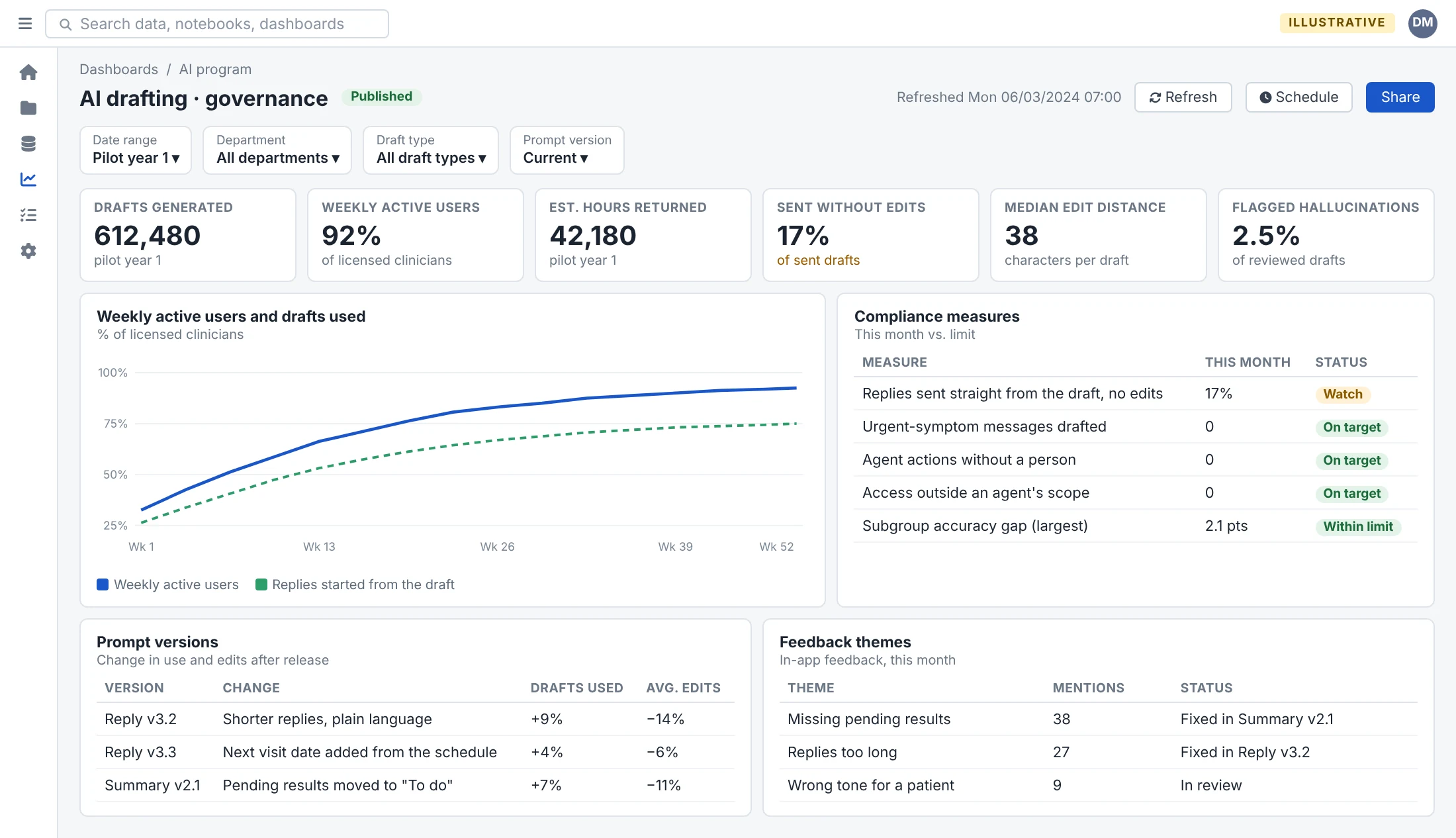
What clinicians did with each draft, and what they told us about it, streamed into a real-time Databricks pipeline. For the product work, it moved our iteration cycle from months to days and showed how each prompt change affected usage. For the executive AI steering committee, it was the governance layer, covering legal and compliance measures such as how often a reply went out straight from the generated draft without edits, next to adoption, quality and time returned.
The checks asked three questions. Did the agent do the task it was given? Was every claim supported by the chart? Did it stop and hand off when it should? Clinicians did the judging, not the model grading itself, and the checks kept running after launch.
| What we checked | How | Result |
|---|---|---|
| Task success | Clinicians judged whether each sampled draft did its task without a critical edit | 93% |
| Hallucination | Clinicians reviewed sampled drafts for any statement the chart didn’t support | 2.5% |
| Escalation | Test cases where the agent should not draft and should hand off instead, such as urgent symptoms | Launch gate |
| Security | Prompt-injection and patient-data leakage tests before launch | Launch gate |
| Fairness | Results compared across patient groups, including age, sex, race and ethnicity, preferred language and payer | Launch gate |
| Governance | How often drafts were sent without edits, edit rates and adoption, reported to the steering committee | Tracked throughout |
The rules we designed toward
Responsible AIWorked through with the legal and compliance team. Patient data stays within agreements that cover it, each agent sees the minimum it needs, and every access is logged.
Clinicians see and edit every draft before it goes anywhere, and the agent never acts on its own.
Tools that support patient care have to be checked for discrimination risk, so performance was reviewed across patient groups, not only overall.
Its generative AI profile names risks like made-up answers and data leakage. Our tests map onto them.
Risks and mitigations
| Risk | Mitigation | What shows it works |
|---|---|---|
| A wrong draft reaches a patient or the chart | The draft-only rule, and a clinician who sends or signs | Nothing leaves without a person acting |
| An agent sees more than it needs | Least privilege, with each agent under its own identity | A log of every tool call that can be traced afterward |
| A draft contains an unsupported statement | Review before sending, and clinician review of sampled drafts | The hallucination rate per reviewed draft, with each case fed back |
| Urgent symptoms are treated as routine | Those messages are routed to a nurse and not drafted | Escalation test cases as a gate |
| Quality differs between patient groups | Results reviewed across groups, not only overall | Fairness check as a gate |
| Prompt injection or data leakage | Tests before release, and the minimum data per task | Security check as a gate |
| A draft is sent without being read | The draft-or-blank choice, and edit rates tracked | Drafts sent without edits reported to the steering committee |
Prompts got the same treatment. I co-authored a study of GPT-4 drafting replies to patient messages inside the EHR across provider clinics. It used a pre-post design to compare crowd-sourced manual prompts with a semi-automated prompt design approach, and was presented as a poster at SAIL 2024.
Results and what I learned
| Number | What it is | How to read it |
|---|---|---|
| An estimated 42,000 clinician hours returned in the first year | Time from the tasks the agents took over in the 500-clinician pilot, which had taken up to 40% of a shift across messaging, handoffs, documentation and queues | About the capacity of 20+ full-time clinicians. It is time returned on automated tasks, not a stopwatch study of every shift. |
| 93% task success | The share of sampled drafts clinicians judged as doing their task without a critical edit | Judged by clinicians, not by the model grading itself. |
| 2.5% hallucination rate | Counted per reviewed draft, as the share of reviewed drafts with a claim the chart didn’t support | Each one went into the feedback pipeline, and review before sending meant none reached a patient or the chart unchecked. |
| More than 90% engagement among the 500 pilot clinicians | Use of the pilot tool among the clinicians it was rolled out to | The highest of any piloted UW Health AI tool. It shows adoption, and the hours and quality numbers show whether it helped. |
| Organization-wide | Where the use cases went after the pilot year | The pilot results were what justified scaling them across the system. |
| Months to days | Time to ship a prompt, retrieval or screen fix | What the Databricks pipeline changed. It is why the agents kept improving after launch. |
What I learned
- Define every number before launch. Engagement and hours returned are easy to overstate, and defining them up front is what lets you defend them later.
- Let people choose between the draft and a blank page. The choice kept clinicians in control and told us which drafts weren’t earning their place.
- Shorten the time between fixes. Going from months to days between fixes is what let the agents keep improving after launch.
- Pick the tool before the model. Finance and admin work ran on rules with UiPath, and not every problem on the roadmap needed a language model.
- Plan the rollout with the pilot. The steering committee and the education program are what let a pilot become a system-wide rollout.
- What carries over. The draft-or-blank choice, governance metrics such as how often drafts are sent unedited, and a feedback pipeline that ships fixes in days apply to any regulated workflow where AI drafts and people decide.
What I would do differently
- Write the day-in-the-life journeys for each user group before the audit, so the rubric criteria came from the work itself and not only from the requests.
- Pair the estimate of hours returned with a timed sample of shifts, so the headline number rests on measured time as well as on the tasks taken over.
- Find sourced figures for the named alternatives earlier, so the comparison could name them and not only describe the kinds of tool.
What I would do next
- Bring every new use case through the same five-criteria rubric and the same review, escalation, security and fairness checks before it goes wider.
- Keep reporting drafts sent without edits next to quality, so a rising edit-free rate is read as a prompt to look at review habits and not only as a success.
- Extend the fairness comparison as the use cases reach more units, and report it to the steering committee alongside adoption and hours returned.
Reports
Each report below says what it covers and what it does not.
- The evaluation report. What was checked, how, and what the numbers mean.
- The governance note. The guardrails and the reporting to the AI steering committee.
The evaluation report
This report summarizes the checks. Clinicians judged sampled drafts for task success and for any statement the chart did not support, giving 93% task success and a 2.5% hallucination rate counted per reviewed draft. Escalation, security and fairness were launch gates, and the results table above gives each number and how to read it. It covers the pilot only. The hours returned are an estimate of time on the tasks the agents took over, not a measured change in outcomes.
The governance note
This note summarizes the governance. Nothing reached a patient or the chart until a clinician sent or signed it, each agent read only the data its task needed and logged every step, and usage, edits and feedback flowed into a Databricks pipeline that served as the governance layer for the AI steering committee. It covers how the agents were governed, not the clinical outcomes of patients.